Upstream Notes 4: A Quick Guide to BD Single-Cell Upstream Analysis

📢 What's in this post:
- Why choose BD Rhapsody? A deep dive into its unique advantages
- Starting from scratch: a complete environment setup guide
- Hands-on walkthrough: running the full analysis pipeline step by step
Hello everyone! If you work in the biomedical field, you're probably already familiar with BD — the flow analyzers and cell sorters in most labs are BD instruments. As a leader in flow cytometry, BD has naturally made its move into single-cell genomics. Today, let's take a detailed look at the BD Rhapsody platform and its upstream analysis pipeline.
🤔 Why Choose BD Rhapsody?
1️⃣ How It Works
Unlike 10x Genomics' "microfluidics + oil droplet" approach, BD uses a microwell plate strategy to isolate individual cells. The workflow goes like this:
- A cell suspension and barcoded magnetic beads are loaded onto a microwell plate
- Under gravity, cells and beads settle to the bottom of each well
- After cell lysis, mRNA is captured by oligo(dT) sequences on the bead surface
- Beads are collected for downstream library construction
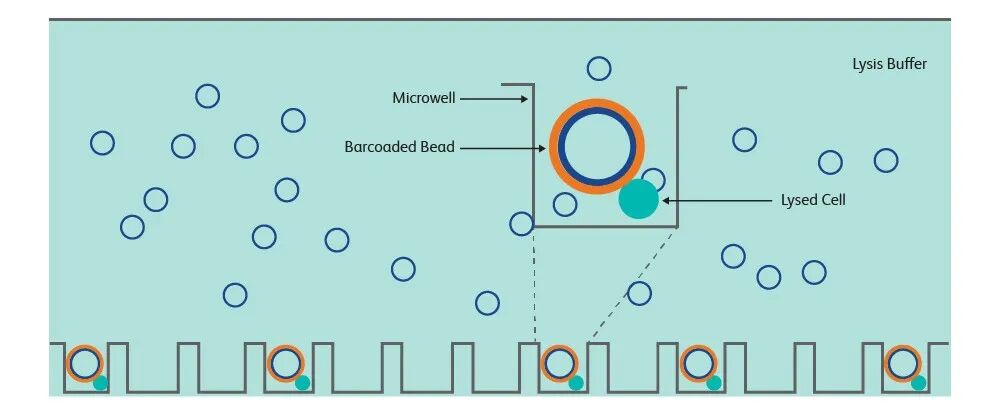
Source: BD Biosciences
2️⃣ Platform Comparison
Both platforms have their strengths — here's a head-to-head comparison:
| BD Rhapsody | 10x Genomics | |
|---|---|---|
| Cell isolation method | Microwell plate | Microfluidics (droplets) |
| Cell capture rate | >80% | ~65% |
| Minimum starting cell number | As few as hundreds | Typically thousands |
| Sample compatibility | Supports FFPE | Primarily fresh samples |
| Cost | Higher | Relatively lower |
| Throughput | High | High |
In summary, BD's key advantages are:
- Higher cell capture efficiency (>80%)
- Compatible with low-input samples
- Able to process FFPE samples
- Supports multi-omics (e.g., AbSeq, scRNA+ATAC, scTCR/BCR)
So if your sample is precious (limited cell numbers) or fragile (e.g., neutrophils), BD is a strong choice. Of course, these advantages come at a price — BD costs more and has somewhat lower scalability, since the microwell plate design is harder to scale up compared to droplet-based approaches.
3️⃣ Library Structure
The BD Rhapsody library structure is quite similar to 10x Genomics. It includes:
- Cell Barcode (CB): identifies the cell of origin
- Molecular Index (MI): analogous to a UMI; used for PCR duplicate removal
- Gene sequence: the actual cDNA sequence from the transcript
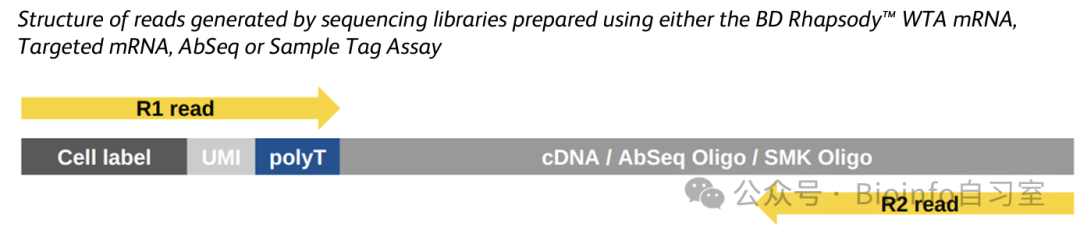
Source: BD Biosciences
💻 Setup and Prerequisites
⚠️ System requirements:
- OS: Linux or macOS
- RAM: at least 96 GB
- Storage: at least 256 GB
- CPU: 8 cores or more
- Required software: Docker, Python 3, CWL-runner
Installing Docker Engine
The instructions below are for Ubuntu. For other operating systems or alternative installation methods, please refer to the official Docker documentation. Installing as root is the simplest route; if you don't have root access, contact your system administrator for assistance. If root access is truly unavailable, the official docs describe a rootless Docker setup — we won't cover that here.
# Check if Docker is already installed
which docker

# If it's installed, skip ahead to the next section.
# Otherwise, follow the steps below.

# Remove any conflicting packages
for pkg in docker.io docker-doc docker-compose docker-compose-v2 podman-docker containerd runc; do
    sudo apt-get remove $pkg
done

# Add Docker's official GPG key
sudo apt-get update
sudo apt-get install ca-certificates curl
sudo install -m 0755 -d /etc/apt/keyrings
sudo curl -fsSL https://download.docker.com/linux/ubuntu/gpg -o /etc/apt/keyrings/docker.asc
sudo chmod a+r /etc/apt/keyrings/docker.asc

# Add the Docker repository
echo \
  "deb [arch=$(dpkg --print-architecture) signed-by=/etc/apt/keyrings/docker.asc] https://download.docker.com/linux/ubuntu \
  $(. /etc/os-release && echo "$VERSION_CODENAME") stable" | \
  sudo tee /etc/apt/sources.list.d/docker.list > /dev/null
sudo apt-get update

# Install Docker
sudo apt-get install docker-ce docker-ce-cli containerd.io docker-buildx-plugin docker-compose-plugin
Test your installation by running a test container:
sudo docker run hello-world
# A successful installation should print:
# Hello from Docker!
# This message shows that your installation appears to be working correctly.
To allow non-root users to run Docker containers, perform this one-time configuration (requires root):
# Create the docker group
sudo groupadd docker

# Add the target user (or current user) to the docker group
sudo usermod -aG docker $USER

# Test without sudo
docker run hello-world
Security note: The configuration above grants the user elevated Docker privileges. If security is a concern, follow the rootless Docker setup instructions in the official documentation instead (some functionality will be limited).
Installing Dependencies and the Pipeline
# 1. Create a conda environment
conda create -n bd-rhapsody python=3.11
conda activate bd-rhapsody

# 2. Install required packages
pip install -U pip
pip install cwlref-runner

# 3. Download CWL and YML configuration files
# The link below may not point to the latest version.
# Check https://bitbucket.org/CRSwDev/cwl/downloads/ for the current repo.
wget https://bitbucket.org/CRSwDev/cwl/get/8d252728f875.zip

# Inspect the downloaded configuration files
ls CRSwDev-cwl-8d252728f875/
# README.md  v1.0  v1.02  v1.10  v1.10.1  v1.11  v1.11.1  v1.12  v1.12.1
# v1.3  v1.5  v1.6  v1.6.1  v1.7.1  v1.8  v1.9  v1.9.1  v2.0  v2.2  v2.2.1

# Inspect the latest v2.2.1 configuration
tree CRSwDev-cwl-8d252728f875/v2.2.1
# ├── Extra_Utilities
# │   ├── AnnotateCellLabelUMI_2.2.1.cwl
# │   ├── make_rhap_reference_2.2.1.cwl
# │   ├── PhiXContamination_2.2.1.cwl
# │   └── README.md
# ├── pipeline_inputs_template_2.2.1.yml
# └── rhapsody_pipeline_2.2.1.cwl

# 4. Pull the BD Rhapsody Docker image
docker pull bdgenomics/rhapsody

# Verify the image
docker images
# REPOSITORY            TAG       IMAGE ID       CREATED         SIZE
# bdgenomics/rhapsody   latest    6d2c53b1b712   6 months ago    3.53GB
# hello-world           latest    d2c94e258dcb   19 months ago   13.3kB
Preparing the Reference Genome
BD provides pre-built reference genomes for human and mouse.
# Transcriptome only (WTA)
# Human GRCh38 + Mouse GRCm38
wget https://bd-rhapsody-public.s3.amazonaws.com/Rhapsody-WTA/Pipeline-version2.x_WTA_references/RhapRef_Human42Mouse24_WTA_2023-02.tar.gz

# Human GRCh38 + Mouse GRCm39
wget https://bd-rhapsody-public.s3.amazonaws.com/Rhapsody-WTA/Pipeline-version2.x_WTA_references/RhapRef_Human42Mouse31_WTA_2023-02.tar.gz

# Human only
wget https://bd-rhapsody-public.s3.amazonaws.com/Rhapsody-WTA/Pipeline-version2.x_WTA_references/RhapRef_Human_WTA_2023-02.tar.gz

# Mouse only
wget https://bd-rhapsody-public.s3.amazonaws.com/Rhapsody-WTA/Pipeline-version2.x_WTA_references/RhapRef_Mouse_WTA_2023-02.tar.gz

# Transcriptome + ATAC (multiome)
# Human + Mouse
wget https://bd-rhapsody-public.s3.amazonaws.com/Rhapsody-WTA-ATAC/Pipeline-version2.x_WTA_ATAC_references/RhapRef_Human-Mouse_WTA-ATAC_2023-11.tar.gz

# Human only
wget https://bd-rhapsody-public.s3.amazonaws.com/Rhapsody-WTA-ATAC/Pipeline-version2.x_WTA_ATAC_references/RhapRef_Human_WTA-ATAC_2023-08.tar.gz

# Mouse only
wget https://bd-rhapsody-public.s3.amazonaws.com/Rhapsody-WTA-ATAC/Pipeline-version2.x_WTA_ATAC_references/RhapRef_Mouse_WTA-ATAC_2023-09.tar.gz
You can also build a custom reference genome. For example:
cd CRSwDev-cwl-8d252728f875/v2.2.1

cwl-runner Extra_Utilities/make_rhap_reference_2.2.1.cwl \
    --Genome_fasta GRCh38.primary_assembly.genome.fa \      # replace with your FASTA
    --Gtf gencode.v43.primary_assembly.annotation.gtf \    # replace with your GTF
    --Archive_prefix testrefhuman43 \                       # custom name for the reference archive
    --WTA_only                                              # flag to build transcriptome only
🚀 Running the Pipeline
Demo Dataset
We'll use the PBMC 2k dataset released by Illumina for this walkthrough. Download instructions are linked in the article. See the article for download instructions.
1️⃣ Prepare the Configuration File
Edit the template pipeline_inputs_template_2.2.1.yml and save it as pbmc2k.yml:
#!/usr/bin/env cwl-runner
cwl:tool: rhapsody

Reads:
  - class: File
    location: "pbmc2k/BD-Bio-NS2K-P2-600c-Sym-FL-10-2K-TD-mRNA_S1_L001_R1_001.fastq.gz"
  - class: File
    location: "pbmc2k/BD-Bio-NS2K-P2-600c-Sym-FL-10-2K-TD-mRNA_S1_L001_R2_001.fastq.gz"

Reference_Archive:
  class: File
  location: "ref/RhapRef_Human_WTA_2023-02.tar.gz"

Run_Name: pbmc2k
Maximum_Threads: 32
Generate_Bam: true
2️⃣ Launch the Analysis
mkdir results_folder

cwl-runner --parallel \
    --outdir results_folder \
    rhapsody_pipeline_2.2.1.cwl \
    pbmc2k.yml
3️⃣ Understanding the Output Files
After the pipeline completes, you'll find the following key output files:
pbmc2k_Pipeline_Report.html— summary analysis reportpbmc2k_Seurat.rds— Seurat object (for R-based downstream analysis)pbmc2k.h5mu— MuData object (for Python/Scanpy-based downstream analysis)pbmc2k_RSEC_MolsPerCell_MEX.zip— count matrix in MEX formatpbmc2k_Bioproduct.bam— BAM alignment file
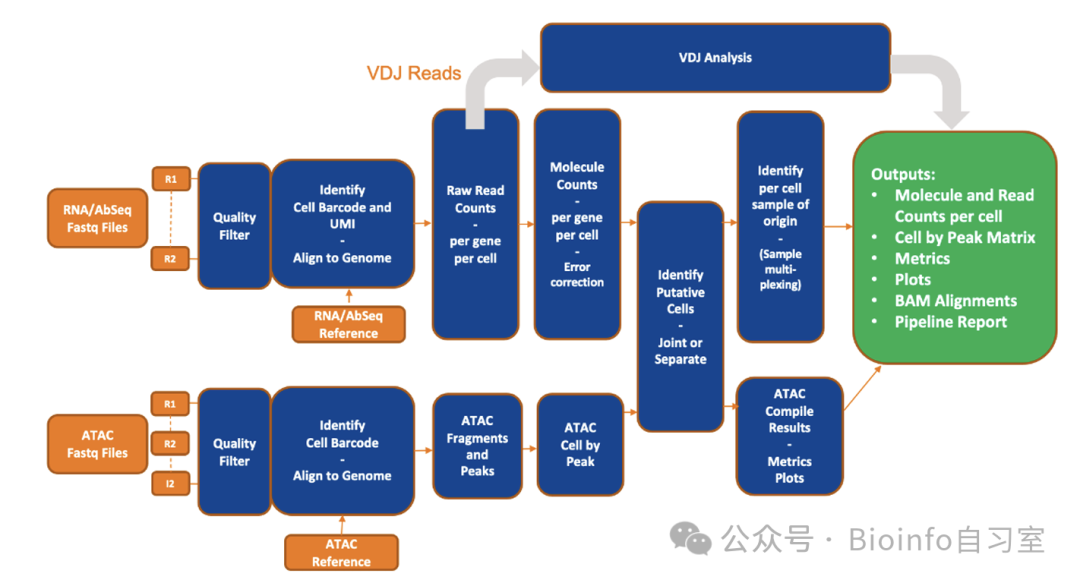
Source: BD Biosciences
References
- BD Rhapsody Bioinformatics Official Documentation
#bioinformatics #single-cell sequencing #BD_Rhapsody #data analysis
Originally posted on WeChat Official Account: bioinfo_studyroom