Upstream Notes 2: Cell Ranger count Isn't That Hard
First: A Few Things to Know
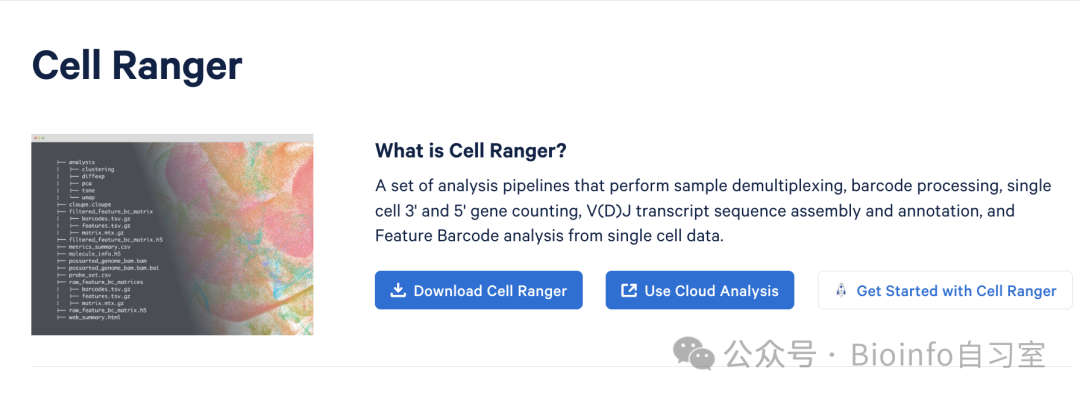 source: 10x Genomics
Cell Ranger only runs on Linux — macOS and Windows are not supported. If you want to do quantification on a Mac, you can try salmon/alevin or kallisto/bustools (bookmarked for a future tutorial 🐎). Alternatively, you can try STARsolo, which reportedly produces nearly identical results to Cell Ranger with a 10× speedup by tuning the right parameters — and if you already use STAR for bulk RNA-seq alignment, you don't even need to install anything extra (also bookmarked for future investigation 🐎).
This tutorial assumes that Cell Ranger is already installed on your server (I won't cover installation here — refer to the official documentation; I'm using v8.0.1) and that you've downloaded the corresponding reference genome (pre-built archives are available on the 10x website; I'm using GRCm39-2024-A).
Cell Ranger offers three pipelines for single-cell upstream processing: cellranger count, cellranger vdj, and cellranger multi. There's also a midstream pipeline, cellranger aggr, originally designed for data aggregation, but it's surprisingly useful for recovering improperly formatted data (i.e., regenerating the count matrix from molecule_info.h5). In short: use count for single-sample, single-modality data (e.g., Gene Expression or Antibody Capture/protein); use vdj for immune repertoire (TCR/BCR); and use multi for multi-sample or multi-modal experiments. See the table below for a breakdown by library type. For data downloaded from SRA, count is sufficient in most cases — though if you're feeling lazy, you can always just run multi for everything.
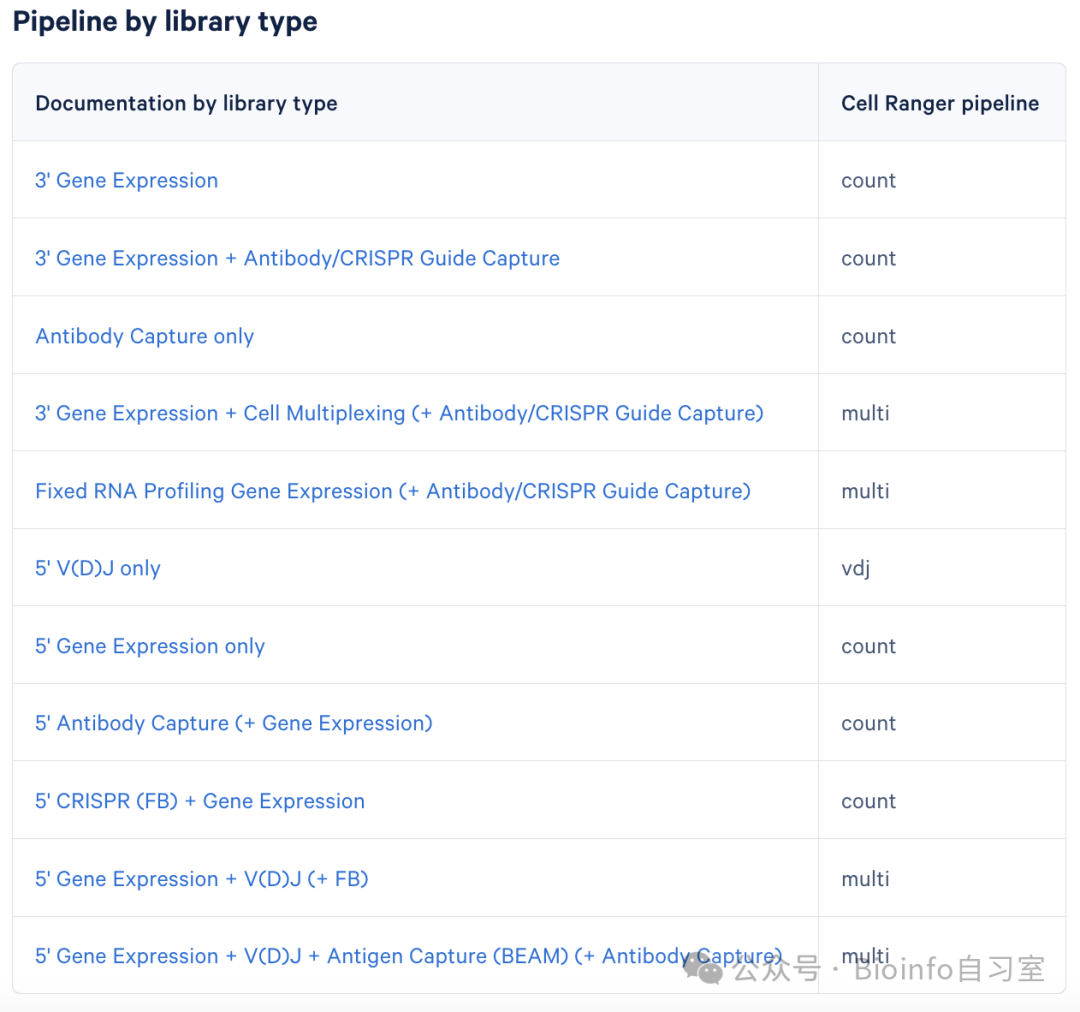 source:
 The cellranger count Pipeline
Code Template
cellranger count --id=Tumor_sample1 \
--transcriptome=/opt/refdata-gex-GRCh38-2024-A \
--fastqs=/home/runs/fastq \
--sample=sample1 \
--create-bam=false \
--expect-cells=5000 \
--nosecondary  \
--localcores=24 \
--localmem=128 \
--output-dir=/home/cellranger_outs
Option Descriptions
Only id and transcriptome are required; all other options are optional.
• (Required) id: A run ID — you can name this whatever you like. The pipeline creates a folder with this name and places all output files inside it. Important: the output directory must not already contain a folder with the same name, or you'll get the error
xxx is not a pipestance directory.• (Required) transcriptome: Path to the reference genome directory. Pre-built references for human and mouse are available for download from the 10x website (other species require you to build your own):
Human + Mouse, suitable for mixed samples like PDX
wget "https://cf.10xgenomics.com/supp/cell-exp/refdata-gex-GRCh38_and_GRCm39-2024-A.tar.gz"
Human only
wget "https://cf.10xgenomics.com/supp/cell-exp/refdata-gex-GRCh38-2024-A.tar.gz"
Mouse only
wget "https://cf.10xgenomics.com/supp/cell-exp/refdata-gex-GRCm39-2024-A.tar.gz"
Extract
tar -xvzf refdata-gex-*.tar.gz
• fastqs: Directory containing the FASTQ files. This must be a directory path, not a file path, and the directory path must not contain a folder with the same name as the
idoption (including parent or child directories) — otherwise you'll hit the samexxx is not a pipestance directoryerror. For example, ifidisTumor_sample1, the FASTQ directory cannot beTumor_sample1/fastqs, butTumor_sample1_fastqsis fine. If omitted, Cell Ranger defaults to reading FASTQs from the current directory.• sample: The sample name prefix in your FASTQ filenames. Note that this is different from
id— this name must match the prefix of your FASTQ filenames exactly (more on this in the next section). For example, if your FASTQ files are named mysample_S1_L001_R1_001.fastq.gz, you should set this to mysample. If omitted, Cell Ranger will auto-detect all samples in the FASTQ directory.• create-bam: Whether to generate a BAM file. The default is
true, but setting it tofalsedoes not affect the pipeline results, so set it tofalseif you want to save time and disk space.• expect-cells: Expected number of cells. A rough range is 1,000–5,000. If you're unsure, you can omit this — the pipeline will still run fine.
• nosecondary: Skip secondary analyses (such as differential expression and clustering). If you plan to run your own downstream analysis, add this flag to significantly reduce runtime.
• localcores: Maximum number of CPU cores/threads. Multi-core processing significantly speeds up the pipeline, but make sure you don't exceed the number of cores available on your machine (or the number you requested in your job submission). If unsure, you can omit this — the pipeline will still run.
• localmem: Maximum memory usage (in GB). Increasing memory can speed things up somewhat. A safe rule of thumb is to keep
localmembelow 10×localcores(i.e., <10 GB per core). For example, with 24 cores, you could set this to no more than 240 GB. Again, if unsure, you can omit this.• output-dir: Output directory. If omitted, output is written to the current directory.
These are the most commonly used options. For a full list, run cellranger count --help.
FASTQ File Naming Convention
FASTQ files input to Cell Ranger must follow a specific naming convention. In short, they should be named as follows:
____.fastq.gz
• SampleName: The sample name, e.g., sample1 — this can be customized.
• SampleIndex: The machine's index for distinguishing samples, usually S1 (i.e., one sample per sequencing run).
• Lane: The sequencing lane number, e.g., L001, L002.
• ReadType: The read identifier. Standard RNA-seq is paired-end (R1 and R2); single-cell sequencing also includes index reads (I1, I2).
• Set: Usually 001, unless sequencing was performed in multiple batches within a single experiment.
Example: For a sample named sample1 sequenced across two lanes, the FASTQ files would be:
• Lane 1, Read 1: sample1_S1_L001_R1_001.fastq.gz
• Lane 1, Read 2: sample1_S1_L001_R2_001.fastq.gz
• Lane 2, Read 1: sample1_S1_L002_R1_001.fastq.gz
• Lane 2, Read 2: sample1_S1_L002_R2_001.fastq.gz
For single-cell data downloaded from SRA, you'll typically get 3 or 4 FASTQ files. If there are 3 files, suffixes 1–3 correspond to I1 (i7 index), R1 (cell barcode & UMI), and R2 (the actual cDNA sequence), respectively. If there are 4 files, they correspond to I1, I2 (i5 index), R1, and R2. Rename the files following this convention, and you're ready to run cellranger count.
About Directory Organization
After renaming your FASTQ files, you can either place different samples in separate directories or put everything in one directory. However, if FASTQ files from different samples are in the same directory, the SampleIndex numbers need to be different. For example, with 5 samples in one directory, the indices should be S1, S2, S3, S4, S5, and ideally the SampleName prefixes should also differ. Otherwise, Cell Ranger will treat files with the same index as belonging to the same sample.
Hands-On Example
Inspecting and Preparing the Data
Suppose I downloaded data from three SRA runs: SRR26213698, SRR26213699, and SRR26213700. According to the metadata, all three runs come from the same mouse, with sample accession GSM7810377 (for details on downloading single-cell data using sra-toolkit, see the previous post). At this point, my working directory contains three folders, each with 4 FASTQ files:
• SRR26213698
• SRR26213698_1.fastq
• SRR26213698_2.fastq
• SRR26213698_3.fastq
• SRR26213698_4.fastq
• SRR26213699
• SRR26213699_1.fastq
• SRR26213699_2.fastq
• SRR26213699_3.fastq
• SRR26213699_4.fastq
• SRR26213700
• SRR26213700_1.fastq
• SRR26213700_2.fastq
• SRR26213700_3.fastq
• SRR26213700_4.fastq
Understanding the FASTQ Files
Let's look at the first few lines of a FASTQ file:
head -n 8 SRR26213698_1.fastq
#output
@SRR26213698.1 A00814:455:HHF52DSX2:1:1101:1841:1016 length=10
GTAGCCCTGT
+SRR26213698.1 A00814:455:HHF52DSX2:1:1101:1841:1016 length=10
FFFFFFFFFF
@SRR26213698.2 A00814:455:HHF52DSX2:1:1101:2275:1016 length=10
GTAGCCCTGT
+SRR26213698.2 A00814:455:HHF52DSX2:1:1101:2275:1016 length=10
FFFFFFFFFF
FASTQ files are organized in groups of 4 lines. The first line of each record starts with @, marking the beginning of a new sequence entry. It also contains technical metadata about the read:
• SRR26213698.1 — Sequence ID
• A00814 — Sequencer instrument ID
• 455 — Run ID
• HHF52DSX2 — Flow cell ID
• 1 — Lane ID (i.e., L001)
• 1101 — Tile number
• 1841 — Cluster X coordinate
• 1016 — Cluster Y coordinate
• length=10 — Sequence length (10 bases)
The second line contains the actual nucleotide sequence, e.g., GTAGCCCTGT. The third line starts with +, marking the beginning of the quality section — the rest of this line may be empty or repeat the header from line 1. The fourth line contains the Phred quality scores, where each ASCII character corresponds to a base. Here, "F" represents a Phred score of 37, meaning the probability of an incorrect base call is less than 1 in 5,000 — a very high quality score.
Examining the other FASTQ files, we find that the individual read lengths across the four files are 10, 10, 28, and 90, which is consistent with the 10x Chromium v3 (dual-index) or v4 (single/dual-index) configuration (see figure below). This confirms that file suffixes 1–4 correspond to I1, I2, R1, and R2, respectively. We also notice that the Lane IDs for SRR26213699 and SRR26213700 are 2 and 3, allowing us to infer that this is a single biological sample sequenced across 3 lanes.
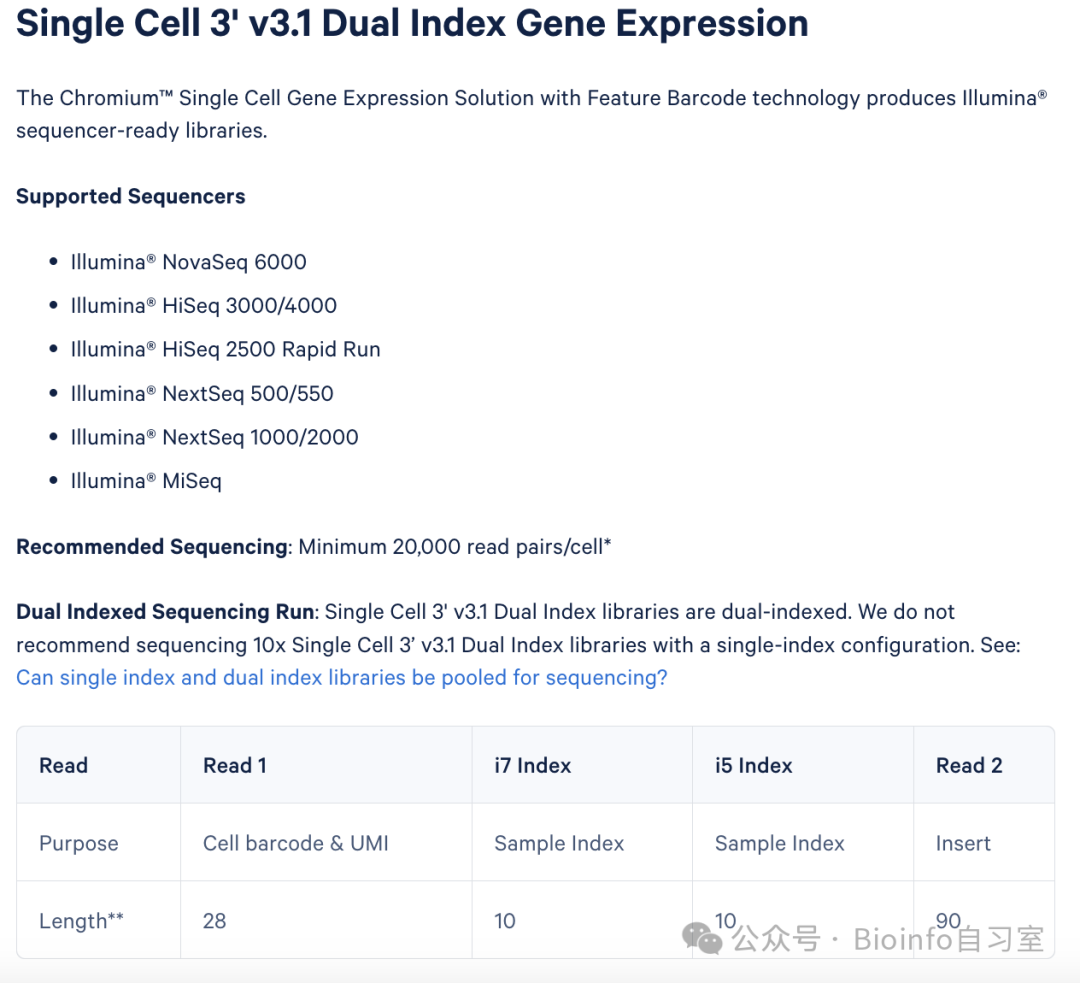 source:
 Running the Pipeline
After renaming the files according to the naming convention, we compress all FASTQs to .gz and place them in a single directory:
• GSM7810381
• GSM7810381_S1_L001_I1_001.fastq.gz (originally SRR26213698_1.fastq)
• GSM7810381_S1_L001_I2_001.fastq.gz (originally SRR26213698_2.fastq)
• GSM7810381_S1_L001_R1_001.fastq.gz (originally SRR26213698_3.fastq)
• GSM7810381_S1_L001_R2_001.fastq.gz (originally SRR26213698_4.fastq)
• GSM7810381_S1_L002_I1_001.fastq.gz (originally SRR26213699_1.fastq)
• (remaining files follow the same pattern)
Now we can run the cellranger count pipeline:
cellranger count --id=Pten1 \
--transcriptome=/home/Ref/refdata-gex-GRCm39-2024-A \
--fastqs=/home/PRJNA1022038/GSM7810381 \
--sample=GSM7810381 \
--create-bam=false \
--nosecondary  \
--localcores=24 \
--localmem=200 \
--r1-length=26 \
--output-dir=/home/result
Notes: The --r1-length=26 flag was added because the R1 read lengths in this sample were inconsistent (possibly due to mixed kit versions or trimming during QC), which caused Cell Ranger to throw an error. The fix is to uniformly trim R1 to 26 bp. If you encounter a similar issue, check the error message for the recommended trim length.
This sample took approximately 45 minutes to process with 24 cores and 200 GB memory. Actual runtime will vary depending on server configuration, file size, single vs. multi-modality, and pipeline settings.
Thanks for reading! If you found this useful, feel free to leave a comment, share, and give it a like! In the next post, we'll walk through the cellranger multi and cellranger aggr pipelines.
Originally posted on WeChat Official Account: bioinfo_studyroom