Mastering Large Language Models: A First Look at APIs


Mastering Large Language Models
A First Look at APIs

Unlock More Possibilities
"Mastering Large Language Models" is a new series launched by Bioinfospace in 2025. Our goal is to help every reader interested in AI — regardless of background — master practical LLM skills from the ground up, and seamlessly integrate them into daily research and workflows. The series plans to cover foundational LLM applications, literature comprehension, cutting-edge LLM research in biomedicine, and useful AI tool recommendations.

From Web Chat to APIs


What is an API?
An API — Application Programming Interface — is essentially a communication bridge between different software systems. For large language models (LLMs), the API is the interface that allows you to call these pre-trained models from within your own programs or research projects. In practical terms, APIs let you embed LLM capabilities — such as automated text generation, semantic analysis, and data summarization — directly into your applications, without manually operating a web-based chat interface. This gives you a high degree of customization while avoiding the computational burden on your local machine and bypassing the limitations of web interfaces (such as context length restrictions).
What Are the Advantages of Using APIs?
Automation and batch processing:
Web interfaces are designed for one-off interactions. But if you need to process large volumes of data — such as generating hundreds of experimental reports or analyzing thousands of abstract summaries — APIs make automation easy.
Model flexibility and cost efficiency:
Like paying for utilities, APIs charge only for the compute you actually use, making them well-suited for budget-constrained projects. You can also flexibly choose between models based on your task and budget, or use aggregator platforms (like OpenRouter) to access and compare multiple LLMs through a single interface.
Customization and integration:
API calls give you fine-grained control over request parameters — including output style, length, and temperature — to better meet the demands of research tasks. More importantly, you can seamlessly integrate LLM capabilities into your own toolchains and platforms for truly customized workflows. Many advanced features — such as multi-turn dialogue, context management, and custom system prompts — are only accessible via API.

Your First API

Developer Platforms
Major commercial LLMs — such as GPT (platform.openai.com) and Claude (console.anthropic.com) — each have their own developer platform. For open-source models, Hugging Face also offers limited API access for prototyping and experimentation.Getting an API key typically involves three steps: (1) register for a developer account; (2) add credits (bad news: it costs money; good news: it's usually affordable, and many platforms offer free tiers); (3) generate your API key.
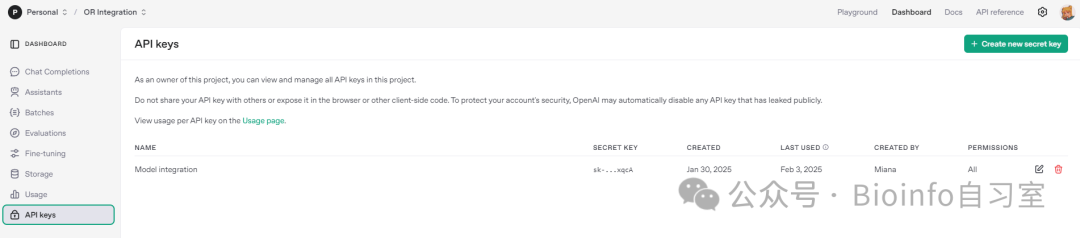
The OpenAI developer console. The long string starting with "sk-" is your API key. Once generated, it cannot be viewed again in this interface — so save it immediately.
⚠️ Important: Your API key is sensitive credentials. Keep it safe from the moment it's generated — don't share it or lose it. Think of it like your house key: if it gets lost, the only option is to generate a new one (revoke the old key and create a fresh one).
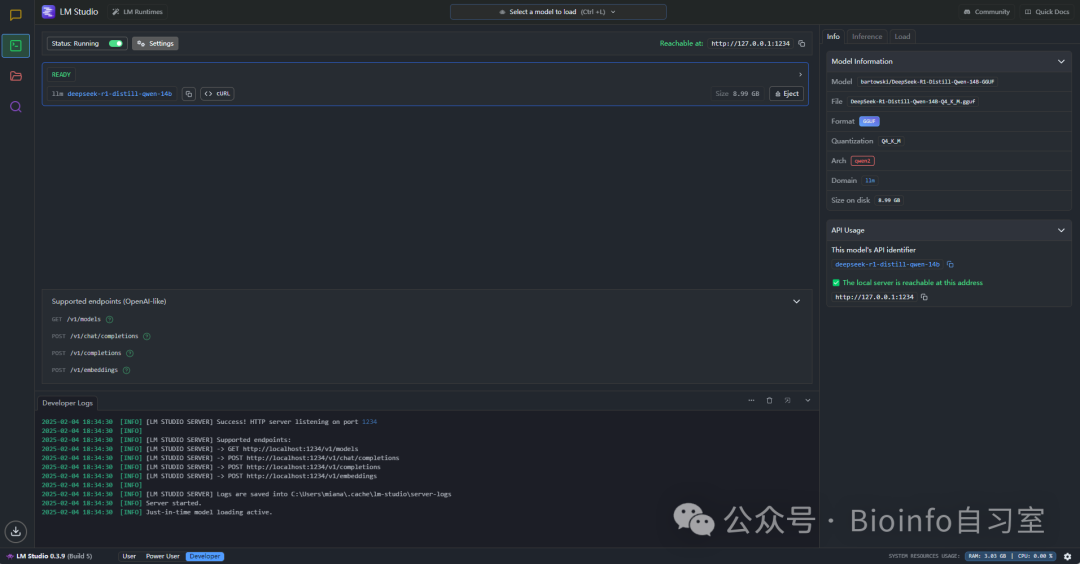
LM Studio (introduced in our previous article) can also expose a local API server — no API key required, since local models don't involve any third-party servers.
Beyond the official developer platforms, many third-party cloud services also offer API access, including AWS, Google Cloud, Alibaba Cloud, OpenRouter, and the recently popular SiliconFlow (SiliconFlow). Some of these platforms offer a "one key, many models" approach, letting you access multiple LLMs through a single unified interface or API key — making it easy to compare model performance across tasks. Others offer more competitive pricing than official channels, or can reduce latency for users in specific geographic regions.
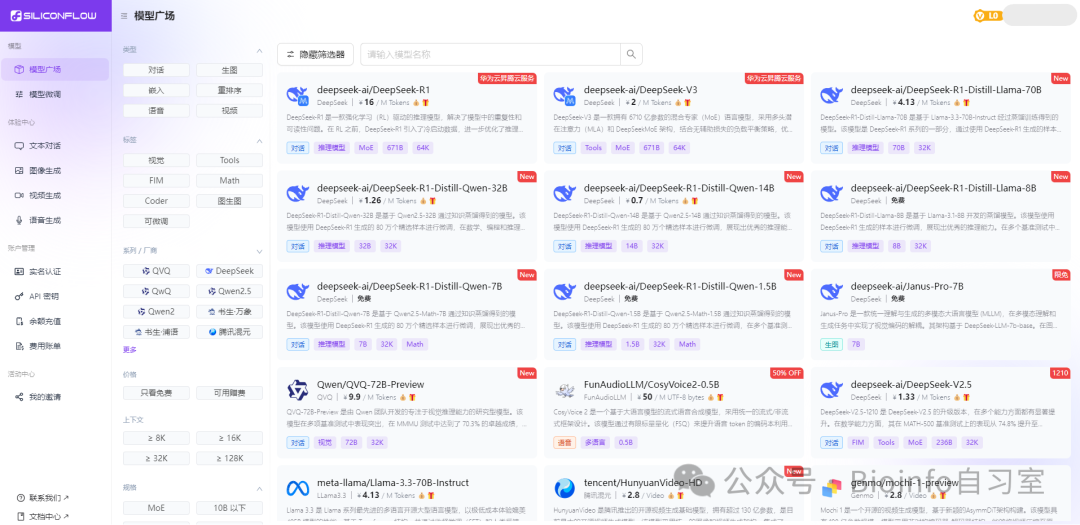
SiliconFlow's model marketplace — featuring a wide selection of multimodal models for text-to-image, video generation, and audio generation.
How to Use APIs
How do you call an API?
API usage generally involves two steps: sending a request and receiving a response. Whether you're a seasoned programmer or have never written a line of code, there's an approach that suits your level.
1. Direct API calls in code
If you're comfortable with programming, you can call APIs directly from Python, R, or other languages. Below is a simple example in Python using the OpenAI API to generate an introduction to CRISPR-Cas9. This code is essentially a universal template — for most platforms, you simply need to swap out the url and api_key:
import requests
import json

# Replace with your own API key
api_key = "sk-your-api-key"

# Define the API endpoint (using OpenAI's GPT as an example)
url = "https://api.openai.com/v1/completions"

# Set request headers and parameters
headers = {
    "Content-Type": "application/json",
    "Authorization": f"Bearer {api_key}"  # Not required for local LLMs
}

data = {
    "model": "text-davinci-003",   # Specify the model to use
    "prompt": "Please explain what CRISPR-Cas9 is in simple terms.",
    "max_tokens": 100,             # Controls the length of the response
    "temperature": 0.7             # Controls the randomness of the response
}

# Send the POST request
response = requests.post(url, headers=headers, data=json.dumps(data))

# Parse and print the response
if response.status_code == 200:
    result = response.json()
    print("Generated text:", result['choices'][0]['text'].strip())
else:
    print("Request failed, status code:", response.status_code)
    print("Error message:", response.text)
The same request in R:
library(httr)
library(jsonlite)

# Replace with your own API key
api_key <- "sk-your-api-key"

# Define the API endpoint (using OpenAI's GPT as an example)
url <- "https://api.openai.com/v1/completions"

# Construct the request body
data <- list(
  model = "text-davinci-003",           # Model to use
  prompt = "Please explain what CRISPR-Cas9 is in simple terms.",
  max_tokens = 100,                     # Controls response length
  temperature = 0.7                     # Controls response randomness
)

# Send the POST request
response <- POST(
  url,
  add_headers(
    "Content-Type" = "application/json",
    "Authorization" = paste("Bearer", api_key)
  ),
  body = toJSON(data, auto_unbox = TRUE)
)

# Check the response and parse the result
if (status_code(response) == 200) {
  result <- content(response, "parsed")
  cat("Generated text:\n", result$choices[[1]]$text, "\n")
} else {
  cat("Request failed, status code:", status_code(response), "\n")
  cat("Error message:", content(response, "text"), "\n")
}
The code above is a minimal template. For more complex tasks, you can modify the prompt section to handle virtually any use case.
2. Third-party tool integration
Many third-party tools support API-powered LLMs, not just through direct programmatic calls but through plugins or built-in integrations that fit naturally into your existing workflow. One of my personal favorites is Cursor.
Cursor is an AI-powered code editor that integrates LLM APIs (e.g., OpenAI's GPT series) to assist with code generation, intelligent auto-completion, and debugging suggestions — and can apply generated code with a single click. It's a genuine productivity powerhouse that dramatically lowers the barrier to coding. Cursor offers a paid Pro plan that grants access to Claude, GPT, and other top models for code completion, but free users can bring their own API key to unlock most of the functionality (a few advanced features are restricted). For example, we asked Cursor to write a program to calculate qPCR fold change (using Cursor's built-in DeepSeek-R1) — and the result was quite impressive.
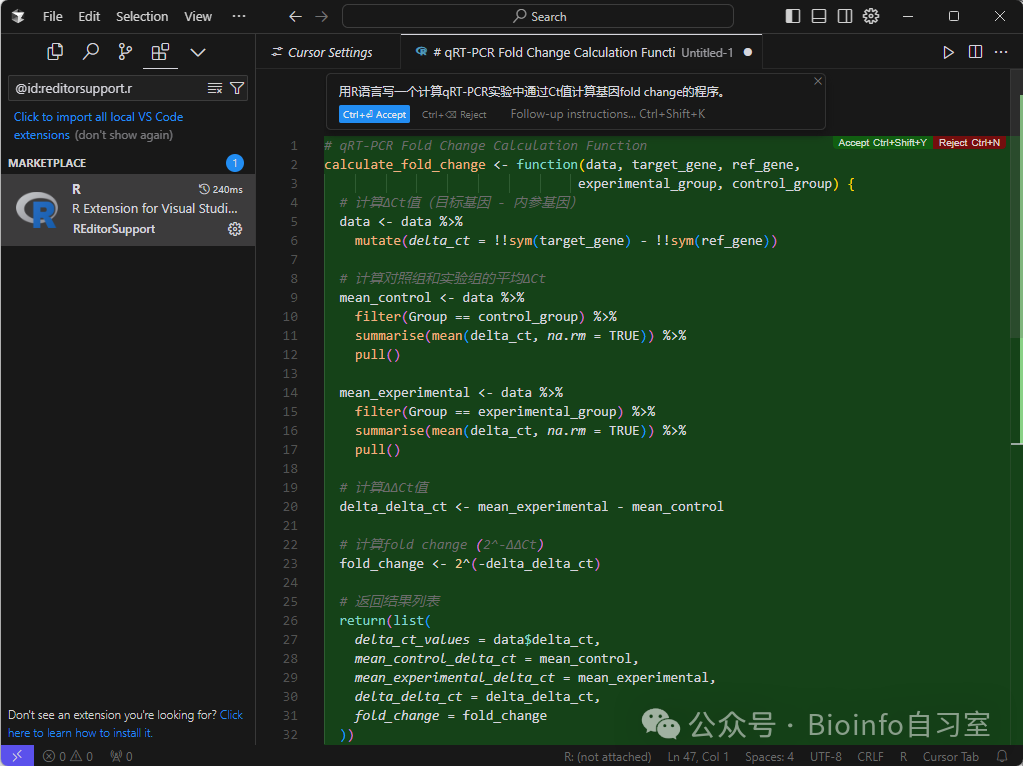
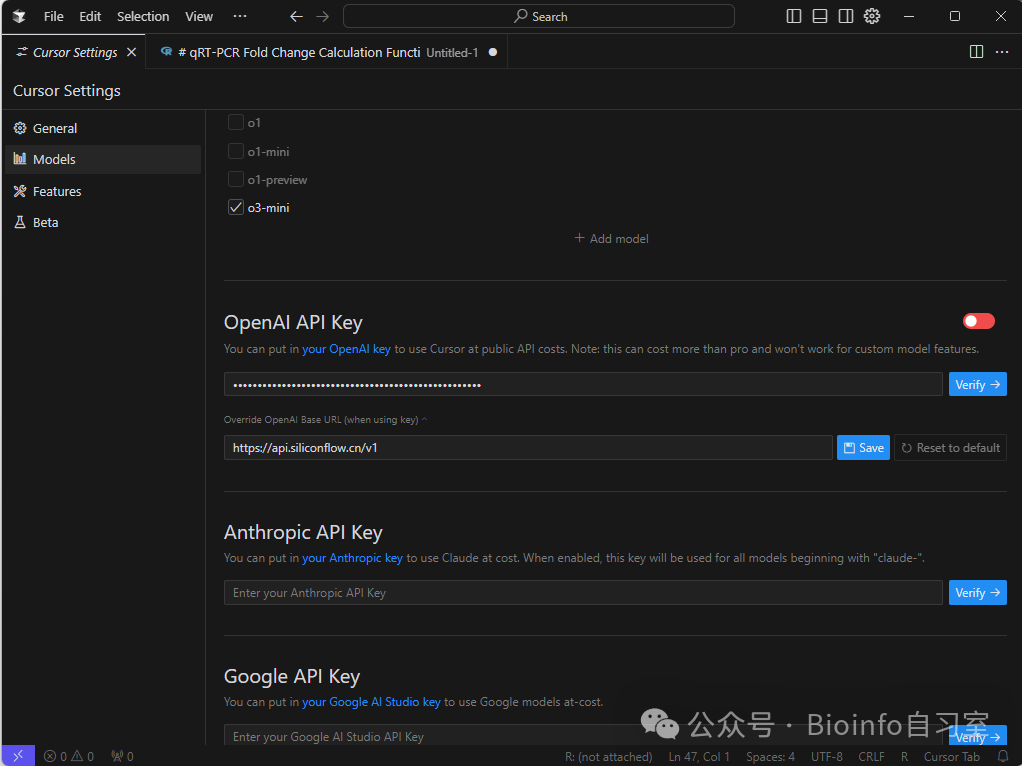
Adding your own API key is straightforward: open Settings → Models, and enter your API key under the model of your choice. If you're using a third-party API service, remember to update the endpoint URL as well.
That's a wrap for this article! Hope you enjoy exploring LLMs! I had originally planned to share a SiliconFlow referral code to give you some free credits, but at the time of publication SiliconFlow was experiencing service instability due to overwhelming demand and had temporarily disabled the referral program.
For those eager to get started, here are some alternatives that all offer free trial credits:
- Nvidia NIM: https://build.nvidia.com/deepseek-ai/deepseek-r1
- Alibaba Cloud Bailian: https://bailian.console.aliyun.com
- Baidu Qianfan: https://console.bce.baidu.com/qianfan
If you've tried any of these platforms, feel free to share your experience in the comments!
Related reading: [ Bringing AI Home: A Beginner's Guide to Local LLMs](
Originally posted on WeChat Official Account: bioinfo_studyroom