Learning Single-Cell Analysis with Theis Lab: MuData — Your Companion for Multimodal Data
Best Practices in Single-Cell Analysis
A Guide to MuData
SECTION PREVIEW
- Understand the characteristics and storage requirements of multimodal data
- Install MuData and learn the structure of multimodal data objects
- Master the core operations and I/O methods of MuData
This section corresponds to Section 4.4 (Advanced: Using MuData to Store Multimodal Data) of the original book.
In the previous tutorial, we learned how to use AnnData for unimodal data such as scRNA-seq. As experimental technologies have advanced, multimodal sequencing methods like CITE-seq can now simultaneously measure both RNA and surface protein expression from the same cells, generating multiple omics readouts in a single experiment and substantially improving throughput.
These multimodal datasets, however, require a purpose-built data structure for storage and management. AnnData is primarily designed for unimodal data. For multimodal data, we turn to MuData (Multimodal Data).
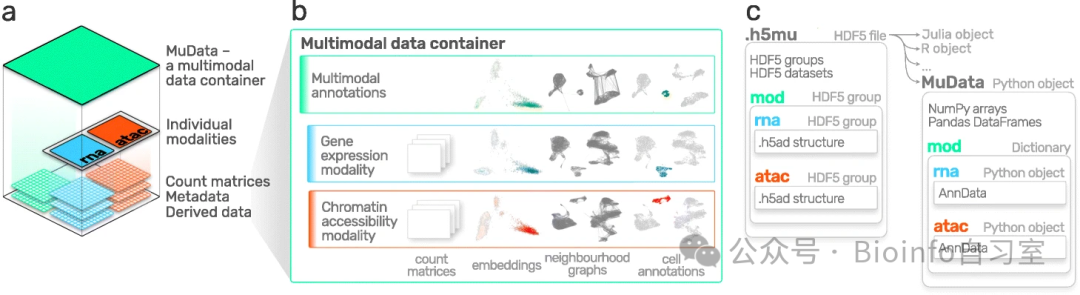 MuData overview. Bredikhin et al., 2022
Installing MuData
MuData can be installed via either PyPI or Conda:
pip install mudata
# or
conda install -c conda-forge mudata
4.4.2 Initializing a MuData Object
The core design philosophy of MuData is to organize multiple AnnData objects — each representing one modality — into a single container, while also providing slots to store cross-modal annotation information.
Structurally, MuData holds a dictionary (dict) in which each key is a modality name and the corresponding value is an AnnData object. In addition, MuData carries attributes analogous to those of AnnData, such as .obs (observation annotations) and .obsm (multi-dimensional observation annotations), which store global information spanning all modalities.
Let's take a quick look at how MuData works:
import mudata as md
Create some simulated data:
import numpy as np
import anndata as ad

# Simulate some data
n, d, k = 1000, 100, 10  # n=observations, d=features, k=latent dimensions

# Generate random data
z = np.random.default_rng().normal(
    loc=np.arange(k), scale=np.arange(k) * 2, size=(n, k)
)
w = np.random.default_rng().normal(size=(d, k))
y = np.dot(z, w.T)  # Shape: (1000, 100)
Create two AnnData objects representing two modalities:
# First modality
adata = ad.AnnData(y)
adata.obs_names = [f"obs_{i+1}" for i in range(n)]  # Observation names
adata.var_names = [f"var_{j+1}" for j in range(d)]   # Feature names

# Second modality
d2 = 50  # 50 features in the second modality
w2 = np.random.default_rng().normal(size=(d2, k))
y2 = np.dot(z, w2.T)  # Shape: (1000, 50)

adata2 = ad.AnnData(y2)
adata2.obs_names = [f"obs_{i+1}" for i in range(n)]   # Same observations as modality 1
adata2.var_names = [f"var2_{j+1}" for j in range(d2)]  # Feature names
Wrap both AnnData objects into a single MuData object:
# Create a MuData object, naming the modalities "A" and "B"
mdata = md.MuData({"A": adata, "B": adata2})

print(mdata)
# Output:
# MuData object with n_obs × n_vars = 1000 × 150
#   2 modalities
#     A:    1000 x 100
#     B:    1000 x 50
This MuData object contains 1,000 observations and 150 features in total (100 + 50), distributed across two modalities.
Modalities A and B can be thought of as two different types of measurements from the same set of cells. In a CITE-seq experiment, for example, modality A would hold RNA-seq data and modality B would hold surface protein (ADT) data. Both modalities share the same observations (cells) but measure different features (genes vs. proteins).
4.4.3 MuData Attributes
MuData objects have many attributes. Here are the most commonly used ones:
1. Accessing modalities: via the .mod attribute or bracket notation
# List all modality names
print(list(mdata.mod.keys()))  # Output: ['A', 'B']

# Access modality A
print(mdata.mod["A"])  # Method 1
print(mdata["A"])      # Method 2 (shorthand)
2. Shape information: MuData's shape reflects the combined dimensions
print(mdata.shape)   # Output: (1000, 150)
print(mdata.n_obs)   # Output: 1000 (number of observations)
print(mdata.n_vars)  # Output: 150 (total number of features)

# Check each modality's shape
print([adata.shape for adata in mdata.mod.values()])
# Output: [(1000, 100), (1000, 50)]
3. Updating MuData: if you modify an underlying AnnData object, call update() to sync changes
# Rename the features of modality B
adata2.var_names = ["var_ad2_" + e.split("_")[1] for e in adata2.var_names]

# Check feature names in MuData before updating
print("Feature names before update: ...", ", ".join(mdata.var_names[-3:]))

# Sync changes to MuData
mdata.update()

# Check again after updating
print("Feature names after update: ...", ", ".join(mdata.var_names[-3:]))
Note ⚠️: MuData stores references to the underlying AnnData objects, not copies. Any modification to the original AnnData will therefore be reflected in MuData immediately.
# Add an entry to the original adata
adata.uns["some_key"] = {"this_is": "test_data"}

# Access it through MuData
print(mdata.mod["A"].uns["some_key"])  # Output: {'this_is': 'test_data'}
4.4.4 Variable Mapping
When a MuData object is created, mappings between observations and modalities and between features and modalities are generated automatically. In our example, all observations are shared across both modalities, but the features are modality-specific.
# Verify that the observation mapping is complete (all values True)
print(np.sum(mdata.obsm["A"]) == np.sum(mdata.obsm["B"]) == n)  # Output: True

# Inspect the feature mapping for modality A (first 100 are True, last 50 are False)
print(mdata.varm["A"][:5], "...", mdata.varm["A"][-5:])
4.4.5 MuData Views
Just like AnnData, slicing a MuData object returns a view of the original data rather than a copy:
# Create a view of the first 100 observations and first 10 features
view = mdata[:100, :10]
print(view.is_view)       # Output: True
print(view["A"].is_view)  # Output: True
If you need to modify the data, create a copy first:
# Create an independent copy
mdata_sub = view.copy()
print(mdata_sub.is_view)  # Output: False
4.4.6 Shared Observations
Ideally, all modalities in a MuData object contain the same set of observations. In practice, however, not all cells are always measured across every modality. MuData accommodates this by allowing different modalities to have different observation sets. Tools such as muon.pp.intersect_obs() can be used to handle the missing-data case.
4.4.7 Reading and Writing MuData
MuData objects are serialized to HDF5-based .h5mu files, with each modality stored under the /mod group:
# Write to file
mdata.write("my_mudata.h5mu")

# Read back from file (backed=True keeps data on disk; only metadata is loaded into memory)
mdata_r = md.read("my_mudata.h5mu", backed=True)
print(mdata_r)
If the original object is backed, you must supply a filename when creating a copy:
mdata_sub = mdata_r.copy("mdata_sub.h5mu")
print(mdata_sub.is_view)   # Output: False
print(mdata_sub.isbacked)  # Output: True
4.4.8 Multimodal Analysis
Once your MuData object is ready, you can apply multimodal analysis methods. The simplest approach is to concatenate the feature matrices of all modalities horizontally and then perform dimensionality reduction.
For example, we can stack both modality matrices side by side and run PCA:
# Horizontally concatenate the two modality matrices
x = np.hstack([mdata.mod["A"].X, mdata.mod["B"].X])
print(x.shape)  # Output: (1000, 150)

# Define a simple PCA helper function
def simple_pca(mdata):
    from sklearn import decomposition

    # Concatenate all modality matrices
    x = np.hstack([m.X for m in mdata.mod.values()])

    # Run PCA, retaining 2 principal components
    pca = decomposition.PCA(n_components=2)
    components = pca.fit_transform(x)

    # Store the components in MuData's .obsm slot
    mdata.obsm["X_pca"] = components

# Run PCA
simple_pca(mdata)
print(mdata)
It is worth noting that in real analyses, features from different modalities typically follow very different generative mechanisms and distributions, so naive concatenation is rarely the optimal integration strategy. For multi-omics data, specialized multi-modal integration methods are generally preferred. The muon package provides a range of such algorithms that can more effectively uncover associations between modalities. We will cover these methods in detail in future tutorials.
Closing Thoughts
In this installment, we took a detailed look at the structure and core operations of MuData — the foundation for all subsequent multimodal single-cell analyses. With the rapid development of multimodal technologies such as CITE-seq and ATAC-seq, handling heterogeneous omics data has become an essential skill in the single-cell analysis toolkit. By organizing multiple AnnData objects into a single coherent container, MuData elegantly solves the data storage and access challenges posed by multimodal experiments.
It is also worth highlighting that, like AnnData, MuData supports the view/copy mechanism, enabling efficient handling of large-scale datasets. By maintaining direct connections to on-disk files, MuData can keep memory usage low while accelerating data processing — a property that becomes increasingly valuable as single-cell multi-omics datasets continue to grow in scale.
A quick summary:
- MuData is an extension of AnnData designed specifically for storing and processing multimodal data.
- A single MuData object holds multiple AnnData objects, each representing one modality.
- MuData stores not only per-modality data but also cross-modal annotation information.
- With MuData, you can seamlessly perform both single-modality operations and integrated multimodal analyses.
In the next tutorial, we will dive deeper into the muon package for multimodal data analysis. Stay tuned!
Originally posted on WeChat Official Account: bioinfo_studyroom