Is STARsolo Really 10× Faster Than CellRanger?

If you're doing single-cell RNA-seq analysis, you've almost certainly heard of CellRanger. And if you've ever worked on bulk RNA-seq upstream processing, you're equally familiar with the celebrated aligner STAR.
What you might not know is that STAR ships with a dedicated module for single-cell quantification: STARsolo. It's leaner and more flexible than CellRanger, works out of the box with no OS restrictions, and yes — running a single-cell upstream pipeline on your laptop is absolutely within reach. This tutorial walks you through STARsolo step by step.
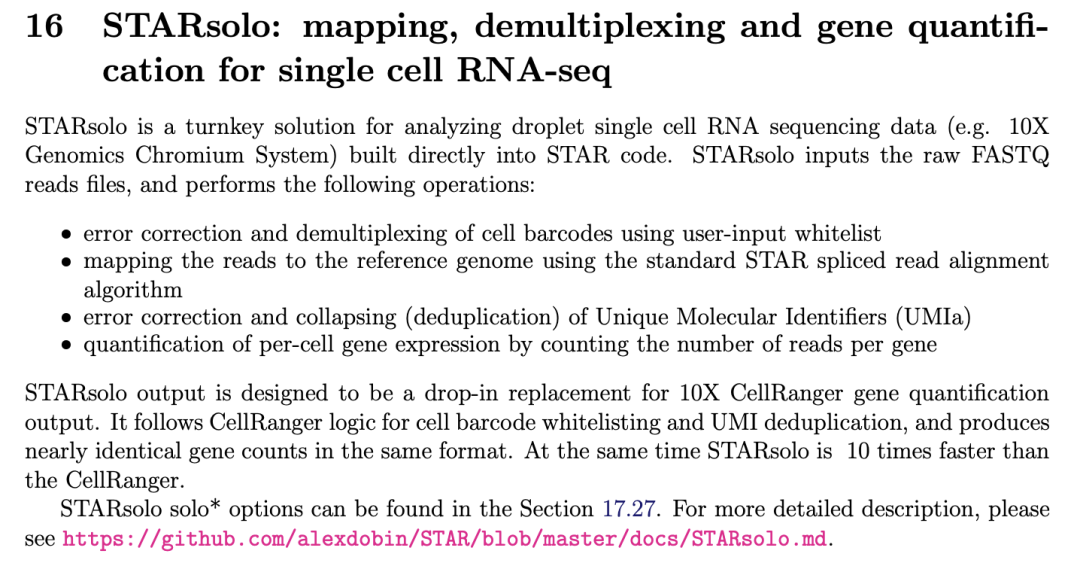
Source: STAR manual
Installation
⚠️ Already have STAR installed? You're all set. STARsolo is not a separate tool — it's part of STAR itself!
The easiest way to install is via conda:
conda install bioconda::star
# or
conda install -c bioconda star
Note that Apple Silicon (M-chip) Macs require some extra steps — see GitHub Issue #2142 and this previous post for details. If that sounds like too much hassle, you can use the Docker version instead (at a ~10–20% performance cost). I've also pre-compiled a native binary for Mac that works without issues — it's included in the code package linked at the end of this article.
Building the Genome Index
If you've already built a STAR genome index (e.g., for bulk RNA-seq), you can reuse it — STAR and STARsolo share the same index format.
To build a fresh index (example: mouse GRCm39 genome):
⚠️ Heads up: This step is memory-intensive (~30–50 GB RAM) and time-consuming (anywhere from ten minutes to a few hours, depending on your hardware). Run it on a server if possible.
STAR --runThreadN 16 \
     --runMode genomeGenerate \
     --genomeDir GRCm39 \
     --genomeFastaFiles GRCm39.primary_assembly.genome.fa \
     --sjdbGTFfile gencode.vM36.basic.annotation.gtf \
     --sjdbOverhang 100
The GRCm39.primary_assembly.genome.fa (genome FASTA) and gencode.vM36.basic.annotation.gtf (genome annotation) files need to be downloaded separately — I used the versions from the GENCODE database.
If you don't want to build the index yourself, don't worry — a pre-built index is also included in the code package at the end of this article.
⚠️ Another note: If you want to use a CellRanger genome index (e.g.,
refdata-gex-GRCm39-2024-A/star), you'll need to downgrade STAR to version 2.7.2a. This has not been tested in this tutorial.
Barcode Whitelist (Optional)
In single-cell experiments, each cell is identified by a unique short nucleotide sequence called a barcode. A whitelist is simply a curated list of all valid barcodes for a given chemistry — 10x Genomics, for example, publishes its own whitelist for each kit version.
If you've downloaded the CellRanger installation package, you can find whitelist files at:cellranger-x.y.z/lib/python/cellranger/barcodes/
STARsolo will run perfectly fine without a whitelist, but providing one adds an extra layer of quality assurance by pre-filtering invalid barcodes (and by extension, spurious UMIs).
Hands-On: Running STARsolo
For this tutorial, we'll use a mouse brain cell dataset as our example (included in the code package — see the references at the end for the source). The test was run on macOS 26.0.1.
# Set the maximum number of open files (important! STAR can throw errors without this)
ulimit -n 2048

# Resolve the directory containing this script
SCRIPT_DIR="$( cd "$( dirname "${BASH_SOURCE[0]}" )" && pwd )"

# Sample name
SAMPLE="Mouse_brain"
# Data directory
DATA_DIR="${SCRIPT_DIR}/data"
# Genome index directory
STAR_INDEX="${SCRIPT_DIR}/reference/GRCm39_2.7.11b"
# Barcode whitelist (10x v2)
WHITELIST="${SCRIPT_DIR}/whitelist/737K-august-2016.txt"
# Output directory
OUTPUT_DIR="${SCRIPT_DIR}/results/${SAMPLE}"
# Path to the STAR binary
STAR_BIN="${SCRIPT_DIR}/bin/STAR"

# Create output directory
mkdir -p "${OUTPUT_DIR}"

# Run STARsolo (parameters tuned to match CellRanger-equivalent output)
"${STAR_BIN}" --runThreadN 8 \          # Number of CPU threads
  --genomeDir "${STAR_INDEX}" \
  --readFilesIn "${DATA_DIR}"/SRR8599150_S1_L001_R2_001.fastq.gz \
               "${DATA_DIR}"/SRR8599150_S1_L001_R1_001.fastq.gz \
  --readFilesCommand "gunzip -c" \
  --outFileNamePrefix "${OUTPUT_DIR}/${SAMPLE}_" \
  --outSAMtype None \
  --soloType CB_UMI_Simple \
  --soloCBwhitelist "${WHITELIST}" \
  --soloCBstart 1 \
  --soloCBlen 16 \
  --soloUMIstart 17 \
  --soloUMIlen 10 \
  --soloBarcodeReadLength 0 \
  --soloStrand Forward \
  --soloFeatures GeneFull \             # Includes introns; matches CellRanger ≥v7 behavior
  --soloUMIdedup 1MM_CR \
  --soloUMIfiltering MultiGeneUMI_CR \
  --soloCellFilter EmptyDrops_CR
⚠️ Critical: For
--readFilesIn, always provide R2 before R1! This is the single most common mistake people make.
Without generating a BAM file, STARsolo completed in just 54 seconds — quite impressive. By comparison, CellRanger (Docker version, v9.0.1) took 7 minutes (roughly 5 minutes if secondary analysis is skipped).
Output Directory Structure
Mouse_brain_Solo.out/
├── Barcodes.stats              # Cell barcode quality and filtering statistics
├── GeneFull/                   # Gene quantification results (exons + introns)
│   ├── Summary.csv             # Summary of key metrics (cell count, UMI totals, alignment stats)
│   ├── UMIperCellSorted.txt    # Per-barcode UMI counts (sorted; used for cell calling)
│   ├── Features.stats          # Per-gene statistics (UMI count, number of cells detected)
│   ├── filtered/               # Cell-containing droplets only (post-filtering)
│   │   ├── barcodes.tsv        # Cell barcodes (filtered by EmptyDrops_CR)
│   │   ├── features.tsv        # Gene IDs and names
│   │   └── matrix.mtx          # Sparse UMI count matrix (cells × genes)
│   └── raw/                    # All barcodes (pre-filtering)
│       ├── barcodes.tsv        # All barcodes present in the whitelist
│       ├── features.tsv        # Same gene annotation as filtered/
│       └── matrix.mtx          # Unfiltered UMI count matrix (all barcodes)
The familiar trio of files in filtered/ — barcodes.tsv, features.tsv, and matrix.mtx — is ready to be loaded directly into R or Python for downstream analysis. If you plan to use ambient RNA removal tools such as CellBender, use the files in raw/ instead.
CellRanger vs. STARsolo: Output Metrics
So how do the numbers stack up?
| Metric | CellRanger | STARsolo | Difference |
|---|---|---|---|
| Estimated cell count | 4,308 | 4,291 | −17 (−0.4%) |
| Barcode overlap | 4,308 (100%) | 4,279 (99.3%) | −29 cells |
| Median UMIs per cell | 739 | 659 | −80 (−10.8%) |
| Median genes per cell | 472 | 441 | −31 (−6.6%) |
| Total genes detected | 17,742 | 24,216 | +6,474 (+36.5%) |
Cell-level results are essentially concordant. STARsolo is slightly lower in median UMIs and genes per cell, but detects considerably more total genes. This likely reflects differences in the reference genome index and algorithmic choices.
Sequencing quality metrics are also highly comparable:
| Metric | CellRanger | STARsolo | Difference |
|---|---|---|---|
| Total reads | 8,860,361 | 8,860,361 | 0 |
| Valid barcode rate | 84.5% | 84.5% | 0% |
| Q30 CB+UMI | 91.2% | 91.3% | +0.1% |
| Q30 RNA reads | 56.7% | 56.7% | 0% |
| Sequencing saturation | 10.6% | 10.9% | +0.3% |
| Reads mapped to genome | 56.4% | 55.3% | −1.1% |
| Reads in cells | 90.3% | 90.5% | +0.2% |
Advanced: RNA Velocity
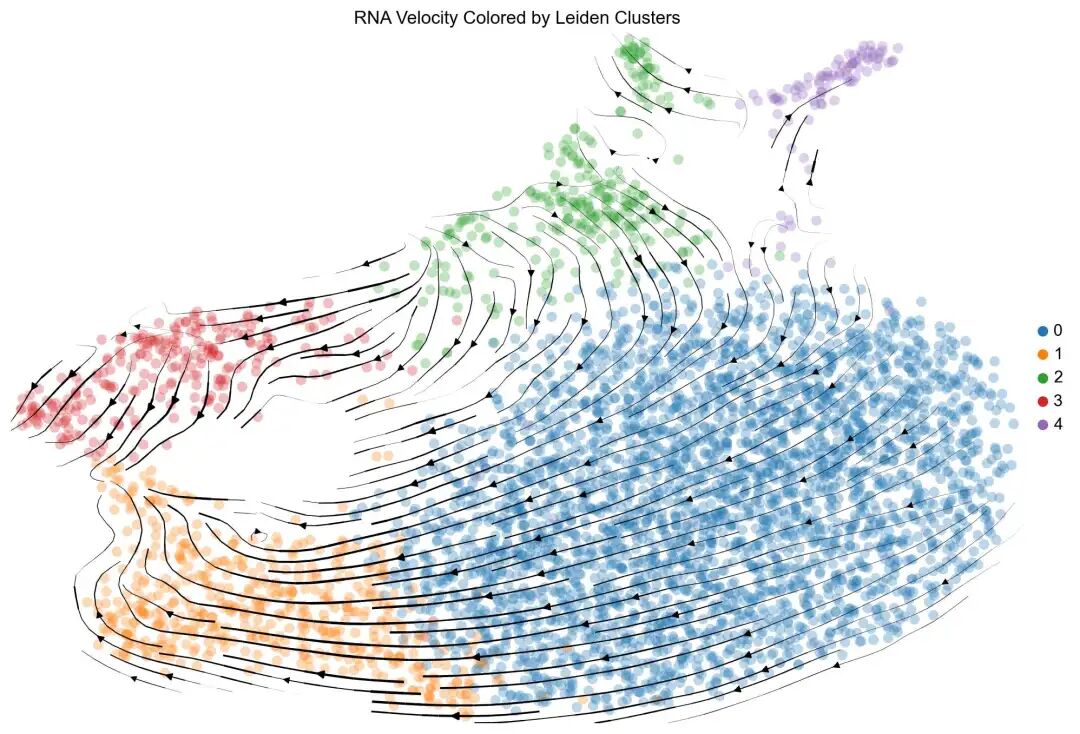
STARsolo has another trick up its sleeve: built-in RNA velocity support. It can generate spliced and unspliced count matrices in a single pass, ready for downstream RNA velocity analysis. All you need to change are two parameters:
- Set
--soloFeaturestoGeneFull Gene Velocyto— this adds exon-level quantification (Gene) and velocity-specific counting (Velocyto) alongside the defaultGeneFulloutput. - Set
--outSAMtypetoBAM SortedByCoordinate— this generates the BAM file required by the Velocyto counting step.
With these two changes, you'll get gene expression quantification and RNA velocity quantification simultaneously.
Key Parameter Reference
| Parameter Category | Parameter | Default | Options | Purpose |
|---|---|---|---|---|
| Single-cell protocol | --soloType |
— | CB_UMI_Simple / CB_UMI_Complex / SmartSeq |
Define the single-cell protocol type |
| Barcode position | --soloCBstart |
1 | Integer | Barcode start position (bp) |
--soloCBlen |
16 | 16 (10x) / 12 (SeqWell) | Barcode length | |
| UMI position | --soloUMIstart |
17 | 17 (10x v3) / 17 (10x v2) | UMI start position |
--soloUMIlen |
12 | 12 (v3) / 10 (v2) / 8 (other) | UMI length | |
| Whitelist | --soloCBwhitelist |
— | File path / None |
Barcode whitelist |
| Strandedness | --soloStrand |
Forward |
Forward / Reverse / Unstranded |
Library strand orientation |
| Quantification features | --soloFeatures |
Gene |
Gene / GeneFull / Velocyto |
Genomic features to quantify |
| UMI deduplication | --soloUMIdedup |
1MM_All |
1MM_All / 1MM_CR / Exact |
UMI deduplication algorithm |
| Cell filtering | --soloCellFilter |
EmptyDrops_CR |
EmptyDrops_CR / TopCells / None |
Cell-calling algorithm |
| UMI filtering | --soloUMIfiltering |
— | MultiGeneUMI_CR / — |
Multi-gene UMI filtering |
| Output type | --outSAMtype |
None |
BAM SortedByCoordinate / None |
Whether to output a BAM file |
Reply with the keyword starsolo in the backend to access all code and sample data for this tutorial, including:
- STAR mouse genome index (GRCm39, compatible with STAR ≥2.7.4a)
- Pre-compiled STAR binary for Apple Silicon Macs (fixes index loading and read output issues; untested on other platforms)
- STARsolo scripts — standard pipeline and RNA velocity versions
- Mouse brain sample FASTQ files
- 10x barcode whitelists for v2 and v3
- Pre-computed STARsolo and CellRanger output for comparison
- Example Scanpy and scVelo downstream analysis pipelines
All scripts and data are pre-tested and ready to use out of the box.
References:
- 10x Genomics — What is a barcode inclusion list (formerly barcode whitelist)? https://kb.10xgenomics.com/s/article/115004506263-What-is-a-barcode-inclusion-list-formerly-barcode-whitelist
- STAR on Apple Silicon Macs — GitHub Issue #2142: https://github.com/alexdobin/STAR/issues/2142
- Sample dataset: https://github.com/BUStools/getting_started/releases
Originally posted on WeChat Official Account: bioinfo_studyroom