Downstream Note 1: The Ultimate pySCENIC Troubleshooting Guide

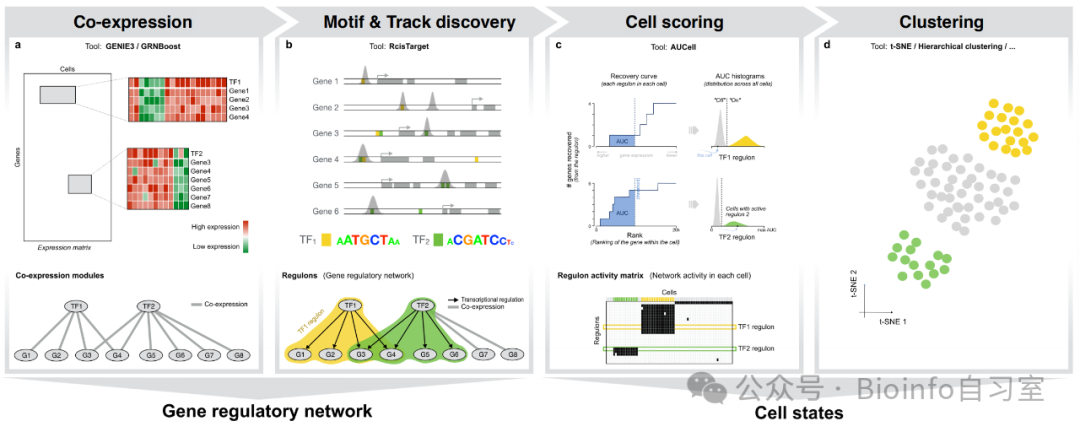
pySCENIC workflow overview (Aerts Lab)
💫 Introduction
Long time no see! Today I'm bringing you an installation tutorial and troubleshooting guide for pySCENIC. SCENIC is a tool for analyzing transcriptional regulatory networks and predicting transcription factor activity in single-cell transcriptomes. It's one of the more widely used advanced analyses in the field (after all, changes in cell state are closely tied to transcription factors). SCENIC is available as both an R and a Python package. pySCENIC offers command-line support, multithreading, simple commands, and fast execution—making it well suited for running on a server. However, pySCENIC's dependency management leaves a lot to be desired, and the official documentation is full! of! pitfalls! If you follow the official docs, you'll very likely end up confused and unable to install it successfully (yes, I was defeated by various errors multiple times). After digging through help files and GitHub discussions, I've finally figured out the secrets to a successful installation and execution!
🔧 Installation Steps
Step 1: Create a conda environment
# Use Python 3.10
conda create -n -y pyscenic python=3.10
conda activate pyscenic
# The GitHub dev version has fixed some errors—give it a try
# pip install git+https://github.com/aertslab/pySCENIC.git
# If you can't download the GitHub version due to network issues, use pip
pip install pyscenic
# Install an older version of dask-expr
pip install dask-expr==0.5.3
Step 2: Download the transcription factor databases
# Human database example
# Motif-to-transcription-factor annotation file
wget https://resources.aertslab.org/cistarget/motif2tf/motifs-v10nr_clust-nr.hgnc-m0.001-o0.0.tbl
# Genome ranking file
wget https://resources.aertslab.org/cistarget/databases/homo_sapiens/hg38/refseq_r80/mc_v10_clust/gene_based/hg38_10kbp_up_10kbp_down_full_tx_v10_clust.genes_vs_motifs.rankings.feather
# Transcription factor list
wget https://resources.aertslab.org/cistarget/tf_lists/allTFs_hg38.txt

# Mouse database example
# Motif-to-transcription-factor annotation file
wget https://resources.aertslab.org/cistarget/motif2tf/motifs-v10nr_clust-nr.mgi-m0.001-o0.0.tbl
# Genome ranking file
wget https://resources.aertslab.org/cistarget/databases/mus_musculus/mm10/refseq_r80/mc_v10_clust/gene_based/mm10_10kbp_up_10kbp_down_full_tx_v10_clust.genes_vs_motifs.rankings.feather
# Transcription factor list
wget https://resources.aertslab.org/cistarget/tf_lists/allTFs_mm.txt
Step 3: Prepare input files
If you're using Seurat, you'll first need to convert your data to loom format. I use the SeuratDisk package for this. Remember to close the loom file after conversion to save all changes.
# R
# Load required packages (installation steps omitted)
library(SeuratDisk)
library(SeuratObject)
# Read data
obj <- readRDS("seurat_obj.rds")
# Convert to loom
obj.loom <- as.loom(obj, filename = "obj.loom")
# Close the loom file
obj.loom$close_all()
🚨 Common Errors
TL;DR Version
Error Summary Table
| Error Type | Solution | When It Occurs |
|---|---|---|
np.object error |
Change np.object to object in transform.py |
Any pyscenic command |
np.string_ error |
Change np.string_ to np.bytes_ in normalize.py |
grn |
Must supply delayed object |
pip install dask-expr==0.5.3 |
grn |
np.float error |
Change np.float to np.float64 in diptest.py |
aucell |
np.msort error |
Change msort to sort in binarization.py and diptest.py |
aucell |
iteritems error |
Change iteritems to items in utils.py |
aucell |
numpy.ndarray error |
Modify line 26 in utils.py | aucell |
Detailed Error Descriptions
You can apply these fixes proactively—no need to wait until you hit the error mid-run!
np.object Error
Running pyscenic --help or any pyscenic command throws:
AttributeError: module 'numpy' has no attribute 'object'.
You need to find the transform.py file in the pyscenic package and replace all instances of np.object with object:
# bash
# Open transform.py with nano—replace the path with your own
nano /path/to/miniconda3/envs/pyscenic/lib/python3.10/site-packages/pyscenic/transform.py
# Ctrl+\, type np.object, Enter, type object, A (replace all), Ctrl+X then Y to save and exit
After this fix, pyscenic --help should display the help documentation normally.
np.string_ Error
Occurs when running pyscenic grn:
AttributeError: `np.string_` was removed in the NumPy 2.0 release. Use `np.bytes_` instead.. Did you mean: 'strings'?
This time the problem is in loompy's normalize.py. Similar to the first error—replace np.string_ with np.bytes_:
# bash
which loompy  # Find the loompy installation directory
# Open normalize.py
nano /path/to/miniconda3/envs/pyscenic/lib/python3.10/site-packages/loompy/normalize.py
# Ctrl+\, type np.string_, Enter, type np.bytes_, A, Ctrl+X, Y to exit
After this fix, pyscenic grn and pyscenic ctx should both run smoothly.
np.float Error
Occurs when running pyscenic aucell:
AttributeError: module 'numpy' has no attribute 'float'.
Again a pySCENIC issue. Change np.float to float in diptest.py:
# bash
# Replace with your own path
nano /path/to/miniconda3/envs/pyscenic/lib/python3.10/site-packages/pyscenic/diptest.py
# Ctrl+\, type np.float, Enter, type float, A, Ctrl+X then Y to exit
msort Error
Occurs when running pyscenic aucell:
AttributeError: module 'numpy' has no attribute 'msort'
This time you need to modify two files simultaneously: diptest.py and binarization.py in the pyscenic package. Change msort to sort in both:
# bash
# Open diptest.py
nano /path/to/miniconda3/envs/pyscenic/lib/python3.10/site-packages/pyscenic/diptest.py
# Ctrl+\, type msort, Enter, type sort, A, Ctrl+X then Y to exit
# Open binarization.py
nano /path/to/miniconda3/envs/pyscenic/lib/python3.10/site-packages/pyscenic/binarization.py
# Ctrl+\, type msort, Enter, type sort, A, Ctrl+X then Y to exit
iteritems Error
Occurs when running pyscenic aucell:
AttributeError: 'Series' object has no attribute 'iteritems'
Modify utils.py in pyscenic/cli/—change iteritems to items:
# bash
# Replace with your pyscenic path
nano /path/to/miniconda3/envs/pyscenic/lib/python3.10/site-packages/pyscenic/cli/utils.py
# Ctrl+\, type iteritems, Enter, type items, A, Ctrl+X then Y to exit
numpy.ndarray Error
Occurs when running pyscenic aucell:
AttributeError: 'numpy.ndarray' object has no attribute 'split'
Back to loompy again. This time, add [0] after get_loom_spec_version(f) on line 26 of utils.py:
# bash
# Replace with your loompy path
nano /path/to/miniconda3/envs/pyscenic/lib/python3.10/site-packages/loompy/utils.py
# Find this line (most likely on line 26 or 27):
vf = int("".join(get_loom_spec_version(f).split(".")))
# Change it to:
vf = int("".join(get_loom_spec_version(f)[0].split(".")))
# Ctrl+X to exit, press Y to save
And now it should finally run smoothly!
🏃 Running pySCENIC
#!/bin/bash

# Define data paths
loomfile='/home/miana/mPCa.loom'
tffile='/home/miana/ref/allTFs_mm.txt'
tblfile='/home/miana/ref/motifs-v10nr_clust-nr.mgi-m0.001-o0.0.tbl'
motiffile='/home/miana/ref/mm10_10kbp_up_10kbp_down_full_tx_v10_clust.genes_vs_motifs.rankings.feather'

echo "Step 1: Inferring gene regulatory networks and co-expression modules"
pyscenic grn \
--num_workers 16 \
-o "grn_adj.tsv" \
-m grnboost2 \
--seed 2024 \
"$loomfile" \
"$tffile"
echo "Step 1 completed. Co-expression modules saved to grn_adj.tsv"
echo "----------"

echo "Step 2: Inferring TF regulons"
pyscenic ctx \
"grn_adj.tsv" \
"$motiffile" \
--output "ctx_reg.csv" \
--annotations_fname "$tblfile" \
--expression_mtx_fname "$loomfile" \
--num_workers 16 \
--all_modules
echo "Step 2 completed. Regulon file saved to ctx_reg.csv"
echo "----------"

echo "Step 3: Calculating TF activity with AUCell"
pyscenic aucell \
"$loomfile" \
"ctx_reg.csv" \
-o "aucell_mtx.loom" \
--num_workers 16
echo "Step 3 completed. Final AUC matrix saved to aucell_mtx.loom"
echo "All done."
The final loom file can be imported into R for further downstream analysis. Alternatively, in the third step (aucell) you can choose to output as CSV or TSV format for easier handling.
🎯 Additional Notes
Errors may vary across operating systems. For example, when I tested on an HPC running RHEL 9.0, no errors occurred besides the
np.objectone. The solutions in this guide are Ubuntu-based and have been tested on both 20.04 LTS and 24.04 LTS.Because this tutorial involves modifying source code of certain packages, it's strongly recommended to install pySCENIC in a completely isolated conda environment to avoid affecting other programs.
Runtime benchmarks: On an Ubuntu server running locally with ~5,000 cells using 16 threads, pySCENIC took approximately 30 minutes. On an RHEL-based HPC cluster with 24 threads, it took about 22 minutes. Actual runtimes will vary with hardware configurations. For those who've used the R SCENIC package—how does this compare?
📌 Pro tip: Before running pySCENIC on your full dataset, test the pipeline on a small subset first to ensure everything works end to end.
If you found this useful, please like, bookmark, and share! If you have any questions, leave them in the comments. See you next time!
#DownstreamAnalysis #AdvancedAnalysis
📚 References
pySCENIC official documentation
pySCENIC GitHub Issues
Originally posted on WeChat Official Account: bioinfo_studyroom